Automated Email Follow Up: How to Build a Smart System with n8n & Brevo – 30 Days of n8n & Automation – Day 12

Sending the first cold email is easy. It feels productive. You hit “send,” and you feel like you have done your job. But the brutal reality of sales and marketing is that 80% of sales require at least five follow-ups, yet 44% of salespeople give up after just one attempt.
The money is not in the outreach; the money is in the persistence.
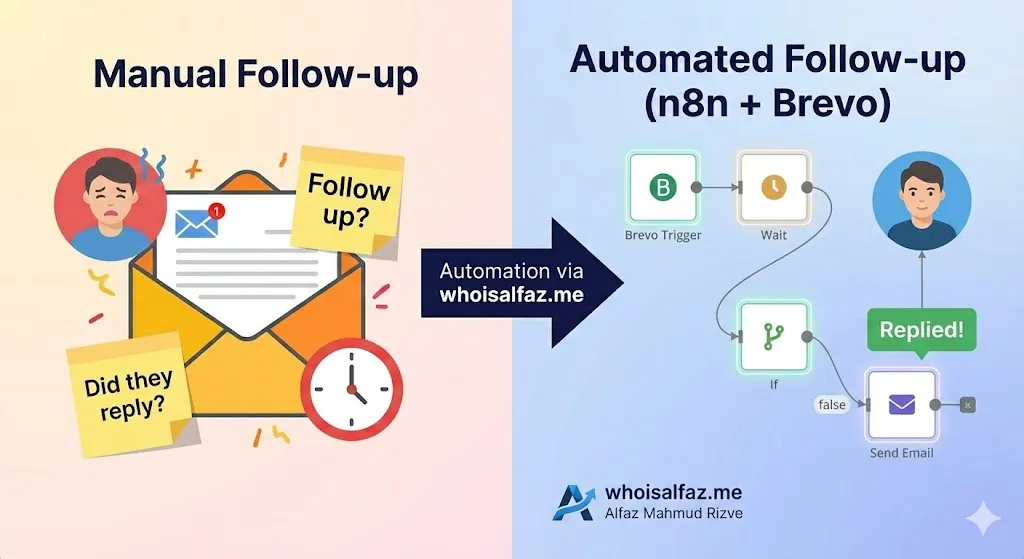
If you are manually tracking who replied, who ghosted you, and who needs a nudge 3 days from now, you are already losing. You are wasting mental energy on administration instead of strategy. Automated email follow up systems are the secret weapon of top-performing agencies, allowing you to build a system that acts as your relentless, polite, and tireless sales assistant.
In this Day 12 guide of 30 Days of n8n & Automation, we are going to move beyond simple “trigger-action” workflows. We are building a stateful automation—a workflow that “remembers” a user, waits for a specific duration, checks for changes in behavior (like a reply), and acts accordingly.
Throughout this deep-dive guide, examples come from real outreach and retention workflows that Alfaz Mahmud Rizve architects for high-growth SaaS companies and lead-gen agencies at whoisalfaz.me.
Why automated email follow up is non-negotiable
Before we open n8n, we need to understand the problem we are solving. Most businesses have a “leaky bucket.” You pour leads in at the top, but they leak out because no one is there to catch them when they don’t buy immediately.
Dedicated tools like Smartlead or Lemlist are great, but they can be expensive and rigid. Building your own automated email follow up system in n8n gives you total control over the logic, integrates with your entire stack (Slack, CRM, Sheets), and costs a fraction of the price.
Here is why you need to automate this today:
- Stop on Reply Logic: The most critical feature. You must never send a “Just bumping this” email to someone who already booked a meeting.
- Context Switching: Stopping your deep work to check “Did John reply?” destroys your productivity flow.
- Deliverability & Consistency: An automated system sends emails at the perfect time, every time, ensuring you never miss a lead due to human error.
At whoisalfaz.me, Alfaz Mahmud Rizve teaches that “Automation is not about replacing humans; it is about allowing humans to focus on the replies, not the silence.”
Architecture: The “Check-Wait-Check” Pattern
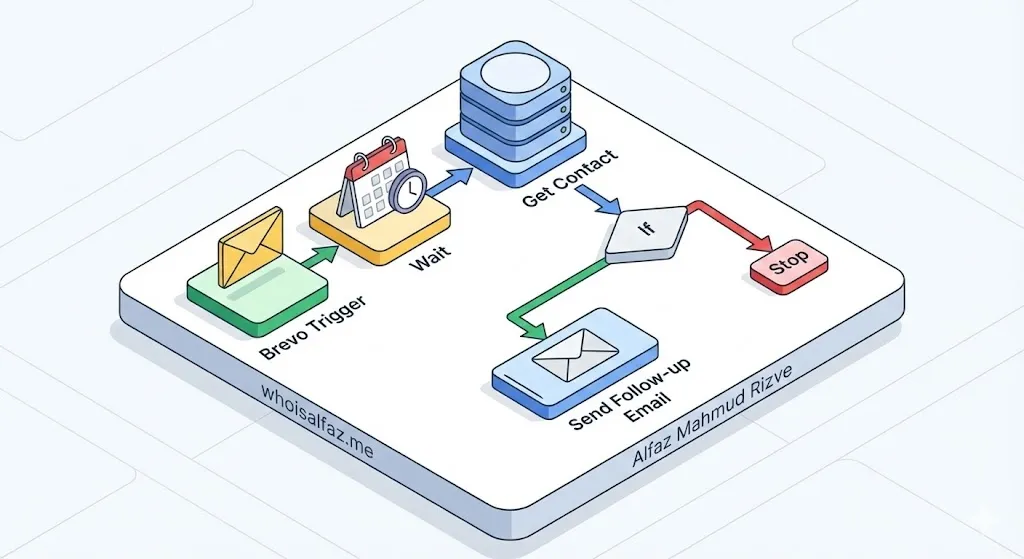
To build a robust automated email follow up system in n8n, you cannot just chain “Email Node” -> “Email Node.” That is how you spam people.
We need a smarter architecture. We call this the Check-Wait-Check pattern.
How it works:
- State 1 (Entry): The user enters the flow (e.g., fills a form). We send the first email immediately.
- State 2 (The Pause): The workflow literally “sleeps” for that specific execution ID. If you set a Wait node for 3 days, n8n pauses that specific run.
- State 3 (The Verification): When the workflow wakes up, it does not send the email immediately. First, it queries the database (Brevo) to ask: “What is the status of this person right now?”
- State 4 (The Decision): An If node compares the fresh status.
- Did they reply? → Stop. (Or alert a human).
- Are they still ‘New’? → Send Follow-up.
This architecture is robust. It handles the edge case where a user replies on Day 2. If your workflow didn’t check on Day 3, you would send them a generic follow-up after they already started a conversation. That is the quickest way to look like a robot and kill a deal.
Prerequisites: Setting up Brevo for Automation
Brevo (formerly Sendinblue) is perfect for this because it has a robust API and allows for “Transactional” sending, which ensures high deliverability.
1. The “Replied” Attribute
You need a way to tell n8n that a user has replied.
- Strategy: Create a contact attribute in Brevo called
LEAD_STAGE. - Default Value:
COLD. - Update Logic: When a user replies (tracked via webhook or manual move), update this attribute to
REPLIED.
2. The Email Templates
Do not write your email body inside the n8n node. It makes editing painful later. Use Brevo’s template builder.
- Template 1 (ID: 5): “Welcome / Here is the info you asked for.”
- Template 2 (ID: 6): “Just bumping this / Did you see my last email?”
- Template 3 (ID: 7): “Last try / specific value add.”
Write these down. You will need the integer IDs (e.g., 5, 6, 7) for the n8n configuration.
Step-by-Step Build: automated email follow up workflow
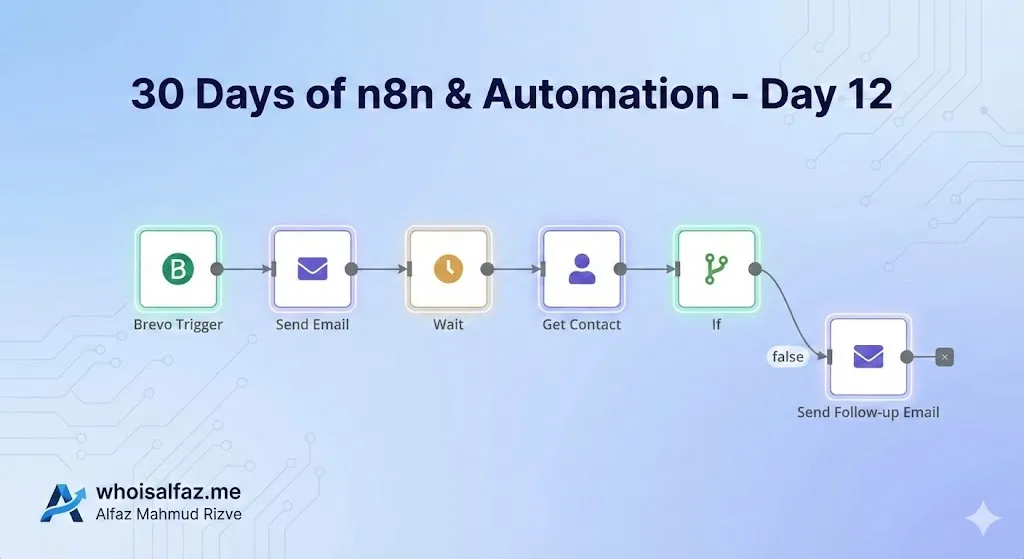
Now, let’s open your n8n editor. We will build this node by node.
Phase 1: The Entry Point
Node 1: The Trigger
- Node Type:
Brevo Trigger(orWebhook). - Event:
Contact CreatedorContact Added to List. - List Selection: Choose your specific “Inbound Leads” list.
- Why: This ensures the automated email follow up starts the moment a lead exists.
Node 2: The Initial Send
- Node Type:
Brevo. - Resource:
Transactional Emails. - Operation:
Send. - Recipient Email: Expression:
{{ $json.email }}. - Template ID: Enter your first template ID (e.g.,
5).
At this point, the lead has received the first email. Now the magic begins.
Phase 2: The “Hold”
Node 3: The Wait Node
- Node Type:
Wait. - Resume:
After time interval. - Amount:
3. - Unit:
Days. - Important Note: n8n stores the execution data for these 3 days. This “drip” timing is key to simulating natural human behavior.
Phase 3: The Intelligence Check
Node 4: Get Fresh Data
- Node Type:
Brevo. - Resource:
Contact. - Operation:
Get. - Identifier:
Email. - Value:
{{ $json.email }}(Reference the email from the trigger node). - Why: This is the most critical step. We are ignoring the data from 3 days ago and asking Brevo, “What is the status now?”
Node 5: The Logic Branch (If Node)
- Node Type:
If. - Condition: String.
- Value 1:
{{ $json.attributes.LEAD_STAGE }} - Operation:
Not Equal - Value 2:
REPLIED.
Logic Explained:
- If the status is NOT “Replied”, the output goes to the True branch. This means “Yes, continue pestering them.”
- If the status IS “Replied”, the output goes to the False branch. This means “Stop, we are done here.”
Phase 4: The Follow-Up
Node 6: Send Email 2
- Connect to the True output of the If node.
- Node Type:
Brevo. - Template ID: Enter your follow-up template ID (e.g.,
6).
Scaling the Logic: Adding a Third Step
Real sales cadences rarely stop at one follow-up. To add a third email, you simply repeat the pattern after Node 6:
- Add Wait Node 2 (Wait 4 Days).
- Add Brevo Get Contact Node 2 (Check status again).
- Add If Node 2 (Is status still Cold?).
- Add Brevo Send Node 3 (Template ID 7).
At whoisalfaz.me, Alfaz Mahmud Rizve often builds workflows with up to 5 steps, but with increasing delays (Day 1, Day 3, Day 7, Day 14, Day 30). This “Exponential Backoff” strategy prevents you from being marked as spam while ensuring you stay top-of-mind.
Advanced Logic: Making it “Human”
One sign of a robot is receiving an automated email at 3:00 AM on a Sunday. To make your automated email follow up feel human, you should respect business hours.
How to implement “Business Hours Only” in n8n:
You can use the Date & Time node or a simple expression in the Wait node.
Method: Before sending the email, add an If node that checks the current day of the week.
- Expression:
{{ $now.weekday }}(Returns 1-7, where 1 is Monday and 7 is Sunday). - Logic: If
weekday > 5(Saturday or Sunday), route to a Wait node set to “Wait 48 hours” or “Wait until Monday at 9 AM,” then loop back to the send node.
Frequently Asked Questions
Q: Does this automated email follow up adhere to privacy laws? Yes. Since you are using Brevo, all emails include mandatory unsubscribe links. n8n simply triggers the send; Brevo handles the CAN-SPAM and GDPR compliance.
Q: How do I avoid the spam folder? To ensure high deliverability, avoid spam trigger words in your subject lines, keep your sending volume consistent, and always check if the user is blacklisted (Brevo returns emailBlacklisted: true) before sending the next follow-up.
Q: Can I integrate this with my CRM? Absolutely. n8n allows you to add a node to update HubSpot, Salesforce, or Pipedrive every time a follow-up is sent, keeping your sales team in the loop without them lifting a finger.
Series Context
This article is part of the 30 Days of n8n & Automation series at whoisalfaz.me.
Earlier posts you should read next or reference inside your editor:
- Day 11: Lead Enrichment with n8n – The perfect precursor. Enrich your leads before you put them into this email drip to personalize the templates with their company name or city.
- Day 6: Essential n8n Core Nodes – A refresher on how the If and Merge nodes work, which are critical for the logic branches used here.
If you found this deep dive into automated email follow up helpful, try building the simple 2-step version today. You will be surprised how many “dead” leads come back to life with just one automated nudge.
Then, subscribe to the newsletter at whoisalfaz.me so you do not miss tomorrow’s Day 13 automation in the 30 Days of n8n & Automation series from Alfaz Mahmud Rizve.