Is Your n8n Workflow Leaking Client Data? (n8n Data Privacy Protocol for agencies) -30 Days of n8n & automation – Day 18
Welcome back to Day 18 of 30 Days of n8n & Automation.
If you have been following this series since Day 1, you have graduated from building simple “toys” to engineering complex systems. We’ve covered Lead enrichment (Day 11), Automated content research ( Day 15 ), and yesterday, the Reliability Gap (Day 17).
But as you transition from a freelancer tinkering on weekends to an Agency-Grade Automation Engineer, the stakes change.
When you are automating a personal to-do list, a data leak is annoying. When you are automating a client’s Lead Enrichment System, Financial Reporting, or Patient Onboarding, a data leak is a lawsuit.
Most n8n developers I audit are sitting on a ticking time bomb. They focus entirely on “making it work” (Reliability) and completely ignore “making it safe” (Liability).
Today, we are going to talk about the “Silent Leak.”
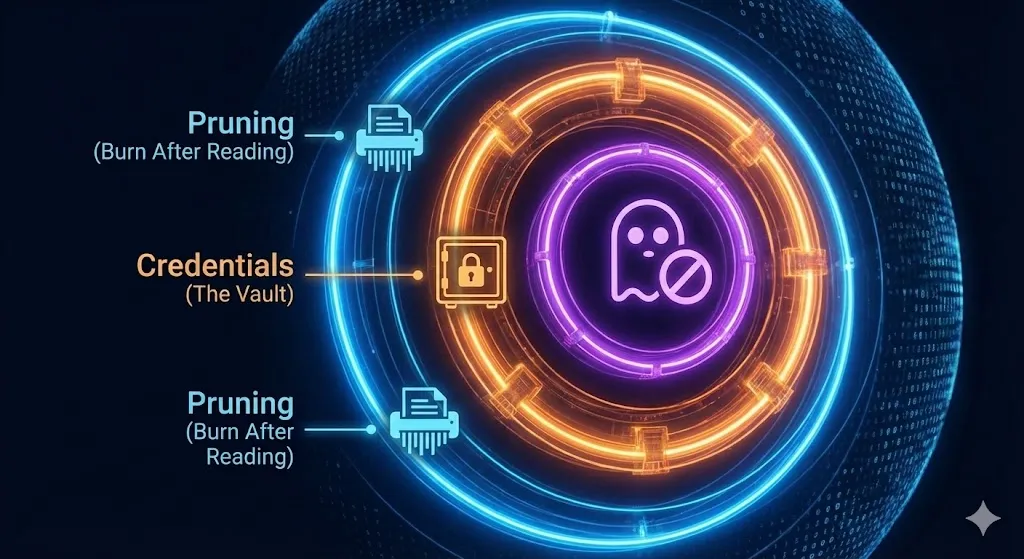
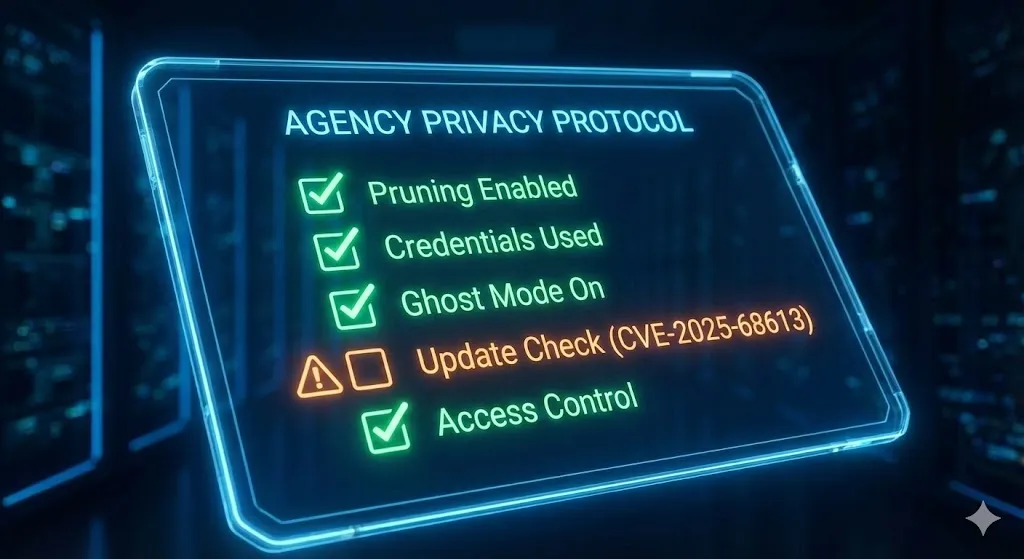
It is a default setting in n8n that is currently recording every email, password, and PDF you process into a plain-text database that you probably haven’t looked at in months. We are going to fix that. We are going to build the Agency Privacy Protocol—a 6-layer defense system that starts with where you host and ends with how you code.
This is not just about security; it’s about Professionalism. You cannot charge premium retainer fees if you are treating client data like public property.
Let’s secure your empire.
The “Open Book” Problem: Why Default n8n is Dangerous
To understand the risk, you have to understand how n8n works under the hood.
n8n is designed for developers. Developers need to debug. To help you debug, n8n (by default) records the Full Execution History of every single workflow run.
This includes:
- Input Data: The incoming webhook payload (e.g., the Typeform submission with the client’s phone number).
- Node Processing: The step-by-step transformation of that data.
- Output Data: The final result sent to Slack or Google Sheets.
- Binary Data: The actual files (PDFs, images, CSVs) you downloaded or generated.
The Nightmare Scenario
Let’s paint a picture of how this destroys an agency.
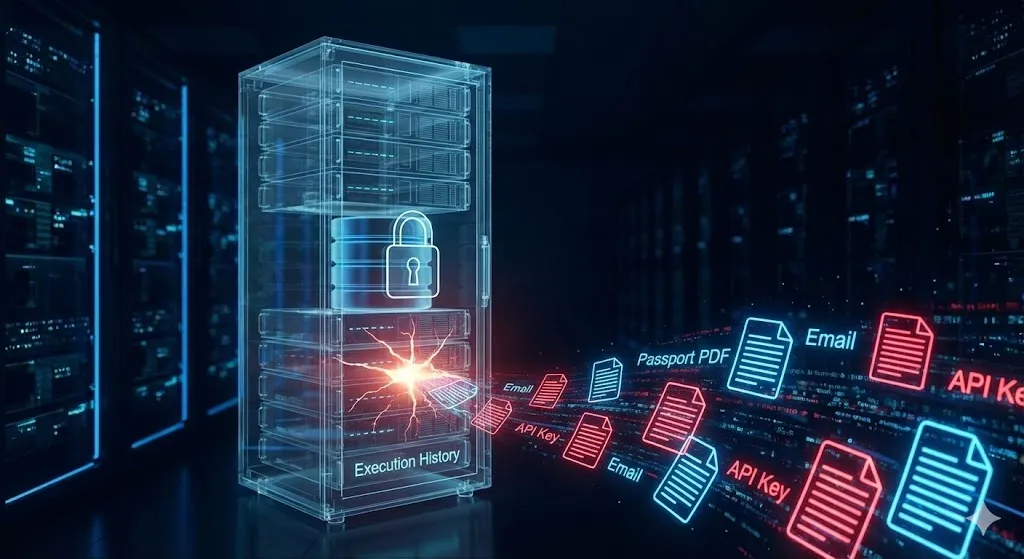
Imagine you built a “Candidate Screening Bot” for a Recruitment Agency client six months ago.
- The Workflow: It accepts a resume (PDF), extracts the phone number and email using OpenAI, and saves it to Airtable.
- The Scale: It processes 100 applications a day.
- The Breach: You hire a Junior Developer to fix a small bug in a different workflow. You give them access to the n8n dashboard.
- The Discovery: The Junior Dev clicks on the “Executions” tab of the Recruitment workflow.
Suddenly, they have access to 18,000 resumes. They can download every PDF. They can read every email. They can see the private notes the AI generated about the candidates.
This data is not encrypted. It is sitting in your Postgres or SQLite database, readable by anyone with dashboard access. If you are handling data for EU citizens, you have just violated GDPR (Article 5). If you are in California, you violated CCPA.
This is The Silent Leak. It’s not a hacker breaking in; it’s your own system working exactly as designed, hoarding data you thought was gone.
Layer 1: The Foundation (Why You Must Self-Host)
The first rule of n8n Data Privacy is simple: Own the Hard Drive.
Many beginners start with n8n Cloud or (worse) shared hosting platforms. While n8n Cloud is SOC2 compliant and excellent for standard businesses, “Agency-Grade” engineering often requires strict Data Residency and Isolation.
If you have a client in Healthcare (HIPAA), Finance, or Legal, you cannot tell them: “Your data is stored on a shared cloud server in Germany mixed with other customers.”
You need to tell them: “Your data is processed on a dedicated, encrypted server that only WE control.”
My Recommendation for self hosting platforms
This is why I exclusively recommend Vultr for your infrastructure layer.
- Isolation: You get a dedicated VPS (Virtual Private Server). No “noisy neighbors.”
- Encryption: You control the disk encryption keys.
- Firewall: You can set up a UFW (Uncomplicated Firewall) that blocks all traffic except from your specific IP address.
- Cost vs. Power: For the same price as a restricted cloud plan, you get High-Frequency NVMe storage that processes JSON 30% faster—critical for encryption overhead.
[Get $300 in Free Credits to Launch Your Private n8n Server on Vultr] (Use this link to spin up a 4GB RAM server. Do not use the $5 plan for production; you need RAM for encryption and log management.)
Once you are on your own metal, you can implement the rest of the Privacy Protocol.
Layer 2: The “Burn After Reading” Strategy (Auto-Pruning)
Now that we own the server, let’s stop the hoarding.
You only need Execution History to debug recent errors. You do not need to know that a workflow succeeded perfectly on a Tuesday three months ago. Keeping that data is a liability, not an asset.
We need to configure n8n to aggressively Prune (Delete) old data.
The Configuration (Environment Variables)
In your Vultr server (inside your .env file or Docker Compose), you must add these three lines. This is the “Agency Standard” config:
Bash
# 1. Enable Pruning (Turn the shredder on)
EXECUTIONS_DATA_PRUNE=true

# 2. Burn Time (Delete logs older than 24 hours)
EXECUTIONS_DATA_MAX_AGE=24

# 3. Fail-Safe (Keep max 1,000 executions to prevent DB crashes)
EXECUTIONS_DATA_PRUNE_MAX_COUNT=1000
Why 24 Hours?
- Debug Window: If a client reports a bug, they usually report it within a day. 24 hours gives you enough time to trace the error.
- GDPR Compliance: By automatically deleting data after 24 hours, you can argue that you are not “storing” data, but merely “processing” it. This is a massive distinction in data privacy laws.
- Performance: A smaller database means a faster n8n instance. I have seen servers crash because the
execution_entitytable grew to 50GB.
Layer 3: Ghost Mode (Node-Level Privacy)
Sometimes, the “Pruning” strategy isn’t enough. What if you are passing a User Password, a Credit Card Token, or a Private Key?
You never want that specific piece of data to appear in the logs, even for 1 second. For this, n8n has a hidden feature I call “Ghost Mode.”
How to Activate It:
- Open any node that handles sensitive data (e.g., an HTTP Request node sending a password).
- Click on the Settings tab (the gear icon).
- Find the option: “Never Save Execution Data”.
- Toggle it to ON.
The Result:
Now, run the workflow.
- Go to the Execution History.
- Click on that node.
- You will see a message: “No data available.”
The data existed in the server’s RAM (Memory) just long enough to be processed, and then it vanished. It was never written to the disk. Even if the FBI seized your server, they could not recover that password.
Agency Rule: Every node that touches PII (Personally Identifiable Information) or Credentials gets set to Ghost Mode. No exceptions.
Layer 4: The Vault (Credential Management)
I still see developers doing this in 2026, and it drives me crazy.
The Mistake: You need to call the OpenAI API. You paste your key sk-proj-12345... directly into the “Authorization” header of an HTTP Request node.
The Risk: That key is now part of your workflow’s JSON export.
- If you share the workflow JSON with a friend? They have your key.
- If you commit the workflow to GitHub? Bots will steal your key in seconds.
- If you look at the Execution History? The key is visible in plain text.
The Fix: Always use n8n’s built-in Credential Manager.
- Go to “Credentials” > “Add New”.
- Enter your API Key there.
- In your nodes, select the credential from the dropdown.
Why it’s safer:
- Database Encryption: n8n encrypts the credentials table in your Postgres database using your
N8N_ENCRYPTION_KEY. - Log Redaction: When you run the workflow, the Execution History will only show
[Credentials]. It masks the actual characters.
Pro Tip: In your .env file on Vultr, ensure you have set a strong encryption key:
Bash
N8N_ENCRYPTION_KEY="Insert-A-Super-Long-Random-String-Here-Alfaz-Says-So"
Warning: If you lose this key, you lose all your credentials. Back it up.
Layer 5: Network Defense (The Moat)
We have secured the inside of the house. Now let’s lock the gate.
A Self-Hosted n8n instance on Vultr is a server on the public internet. If you just run docker-compose up, you might be exposing port 5678 to the entire world. Bots will find you. They will try to brute-force your login.
The Reverse Proxy (Nginx/Caddy)
Never expose n8n directly. Always sit it behind a “Reverse Proxy.”
- SSL/TLS: The proxy handles the HTTPS certificate (Let’s Encrypt). This ensures that when you login from the coffee shop, your password is encrypted in transit.
- Header Sanitization: A proxy can strip out dangerous headers before they reach n8n.
The Firewall (UFW)
On your Vultr dashboard (or via SSH), enable UFW (Uncomplicated Firewall).
- Allow: Port 443 (HTTPS) and Port 22 (SSH).
- Deny: Everything else.
This means even if n8n has a vulnerability, attackers cannot connect to the database port or the n8n internal port directly. They have to go through the front door (HTTPS), which is much easier to defend.
Layer 6: The Human Element (Role-Based Access)
The final layer is Process.
You can have the most secure server in the world, but if your password is n8nadmin123, you are cooked.
The Agency Checklist for Onboarding Staff:
- Least Privilege: Do not make every developer an “Owner.” Use the “Member” role (if on Enterprise/Cloud) or restrict SSH access if on Community Edition.
- MFA (Multi-Factor Authentication): n8n now supports MFA. Turn it on. It is not optional.
- The “Leaving” Protocol: When a developer leaves your agency, you must:
- Rotate the
N8N_BASIC_AUTH_PASSWORD. - Rotate the
N8N_ENCRYPTION_KEY(painful, but necessary if they had root access). - Check the “API Keys” section to ensure they didn’t generate a personal API key to maintain backdoor access.
- Rotate the
Conclusion: The Difference Between a Script and a System
There is a reason why enterprise clients pay $5,000+ for an automation setup that a freelancer charges $500 for.
They aren’t paying for the workflow. They are paying for the assurance that their business won’t collapse because of a data leak.
By implementing this Agency Privacy Protocol, you are differentiating yourself from the crowd. You can look a CEO in the eye and say: “We don’t just automate your leads. We protect them with military-grade encryption, 24-hour auto-deletion protocols, and isolated infrastructure.”
That is how you win the contract.
Your Homework for Day 18:
- Log into your n8n instance.
- Click “Executions.” Scroll back.
- If you see data from last month, STOP.
- Go to your
.envfile and add the Pruning variables I gave you in Layer 2. - Restart your instance (
docker-compose restart).
Tomorrow, on Day 19, we are going to leave the backend and move to the frontend. I will show you how to turn these complex workflows into Beautiful Client Apps using User Interfaces.
[Start Your Agency-Grade Server on Vultr with $300 Free Credit]