n8n Production Workflows & The “Reliability Gap – Why Your n8n Workflows Fail (And How to Build Agency-Grade Systems) – 30 Days of n8n & Automation – Day 17
Welcome back to Day 17 of 30 Days of n8n & Automation.
If you have been following this series since Day 1, you have learned how to build some incredible things. You’ve connected OpenAI to Google Sheets, scraped websites, and maybe even built a chatbot.
But if you are reading this, you have likely hit “The Wall.”
It usually happens at 3:00 AM on a Tuesday. You built a workflow that worked perfectly when you clicked “Execute” in the editor. You felt like a genius. But while you were sleeping, the API timed out. The webhook arrived twice. The execution hung.
You woke up not to a completed task, but to an angry client or a broken system.
This is what I call The Reliability Gap.
It is the dangerous distance between a “Toy Automation” and a true n8n production workflow. Most people never cross this gap. They stay stuck in the “Free Tier” trap, wondering why their automations feel fragile.
Today, we are going to fix that. We are going to stop building toys and start building Agency-Grade Systems. And to do that, we have to talk about infrastructure, error handling, and why an n8n production workflow cannot exist on free limits.
Part 1: Why Your Current Workflow Isn’t a “Production” Workflow
When you start with n8n, you probably sign up for the Cloud Free Tier or a cheap shared hosting plan. It makes sense—you are just testing.
But as soon as you try to automate a real business process (like “Day 14’s Lead Gen System”), you run into two invisible enemies that prevent you from having a stable n8n production workflow.
Enemy #1: The “Retry” Dilemma
To make a workflow reliable, it must be defensive. If OpenAI returns a 503 Service Unavailable error, your workflow shouldn’t crash. It should wait 5 seconds and try again.
But here is the math of the Free Tier:
- Scenario: You have a workflow that runs every 10 minutes (4,300 runs/month).
- The Trap: If you add a “Retry on Fail” loop that retries 3 times, you are effectively tripling your execution count during unstable periods.
- The Result: On a capped plan (e.g., 500 or 2,500 executions), you cannot afford to be reliable. You are forced to disable retries to save credits. You are literally paying for the free tier with your reputation.
Enemy #2: The “Single Lane” Traffic Jam
By default, n8n runs in what we call “Monolithic Mode.” The Editor, the Webhook listener, and the Worker are all one process.

- If you process a heavy 50MB PDF file, that single process gets busy.
- While it is busy, all other webhooks are blocked. They pile up and eventually time out.
- Your simple “Email Notification” workflow fails because your “PDF” workflow clogged the pipe.
This is why agencies don’t use the Free Tier. You cannot build a skyscraper on a foundation made of sand.
Part 2: The Architecture of an Agency-Grade System
So, how do we close the Reliability Gap? We don’t just add more nodes. We change the architecture.
In my agency, we don’t consider an automation “done” until it meets the standard of an n8n production workflow. This requires three specific layers.
Layer 1: The Sentinel (Global Error Handling)
Never let a workflow fail silently. If a tree falls in the forest, your server should scream at you.
Instead of adding error nodes to every single step (which is messy), we use a Global Error Strategy.
- The Sentinel Workflow: We create a dedicated workflow that does one thing: it listens for death.
- The Trigger: The
Error Triggernode. This node is special—it sits dormant and only activates when another workflow crashes. - The Payload: It captures the Workflow Name, the Failed Node, the Error Message, and most importantly, the Execution ID.
- The Alert: It sends a formatted message to a dedicated Slack channel (#alerts-critical) with a direct link:https://n8n.yourdomain.com/execution/{{execution.id}}
The Agency Difference: When a client emails me to say “It didn’t work,” I’ve usually already fixed it because The Sentinel told me 20 minutes ago.
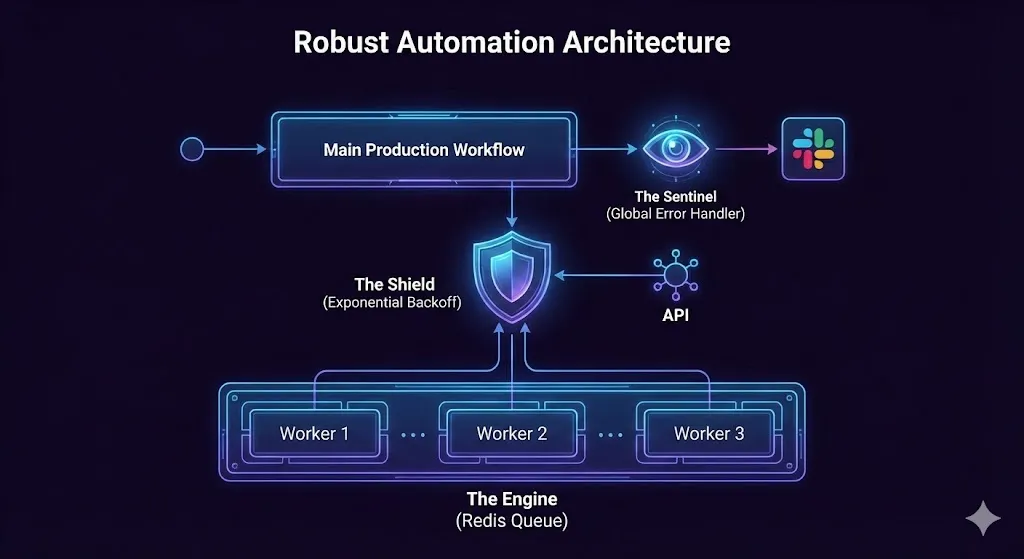
Layer 2: The Shield (Exponential Backoff)
APIs are flaky. Google Sheets goes down. OpenAI gets overloaded.
If your workflow dies on the first error, it is fragile.
- The Amateur Way: “Retry 3 times immediately.” (This just hammers the server and fails again).
- The Agency Way:Exponential Backoff.
- Attempt 1: Fail.
- Wait: 2 Seconds.
- Attempt 2: Fail.
- Wait: 5 Seconds.
- Attempt 3: Success.
This logic requires your server to “hold” the execution open for several seconds or minutes. On the Cloud Free Tier, this consumes “Execution Time” limits. On a self-hosted server, it costs nothing.
Layer 3: The Engine (Queue Mode)
This is the secret weapon. To fix the “Single Lane” traffic jam, we switch n8n into Queue Mode.
This requires a database called Redis.
- How it works: When a webhook comes in, n8n doesn’t process it immediately. It wraps it up as a “Job” and tosses it into Redis.
- The Workers: You can have 5, 10, or 20 “Worker Processes” sitting in the background. They grab jobs from Redis and do the work.
- The Result: If one worker is stuck processing a heavy PDF, the other 19 are still free to handle your email automations. Your system becomes un-crashable.
Part 3: The Infrastructure War (Don’t Run to Monopolies)
Now comes the hard question: Where do we host this?
To run Queue Mode and get Unlimited Executions for your retries, you need a VPS (Virtual Private Server).
Many beginners instinctively run to the “Big Monopolies”—AWS (Amazon), Google Cloud, or Azure. This is a mistake.
Why AWS/Google is a Trap for Solopreneurs
- Hidden Complexity: Have you ever tried to open a port on AWS? You need to configure VPCs, Security Groups, IAM roles, and Elastic IPs. It is over-engineered for what we need.
- The “Bandwidth” Tax: AWS charges exorbitant fees for “Egress” (data leaving the server). If you run an n8n production workflow that moves files (e.g., video processing), your bill will explode.
- Noisy Neighbors: On their cheap “T2/T3 micro” instances, you share CPU power with thousands of other users. If they get busy, your automation slows down.
The Better Option: Vultr (The Developer’s Secret)
In my agency, I moved away from the giants and standard providers like DigitalOcean. I standardized everything on Vultr.
Here is the brutal honest comparison of why Vultr is superior for Automation Engineers:
| Feature | AWS (t3.medium) | DigitalOcean (Droplet) | Vultr (High Frequency) |
| Monthly Cost | ~$30.00+ | $12.00 | **$12.00** |
| Processor Speed | Variable (Burst) | ~2.5 GHz | 3.0 GHz+ (NVMe) |
| Storage Speed | Standard SSD | SSD | NVMe (3x Faster) |
| Bandwidth | Expensive (Pay per GB) | 1 TB | 2 – 4 TB |
| Setup Time | 45 Minutes | 5 Minutes | 2 Minutes |
Why “High Frequency” Matters for an n8n Production Workflow:
Automation is JSON-heavy. Parsing thousands of JSON objects is a CPU-intensive task.
Vultr’s High Frequency servers use 3GHz+ processors and NVMe storage. In my benchmarks, complex workflows run 30-40% faster on Vultr than on a standard DigitalOcean droplet, for the exact same price.
When you are processing 10,000 leads (like we discussed in Day 15), that speed difference saves you hours.
The “David vs. Goliath” Angle:
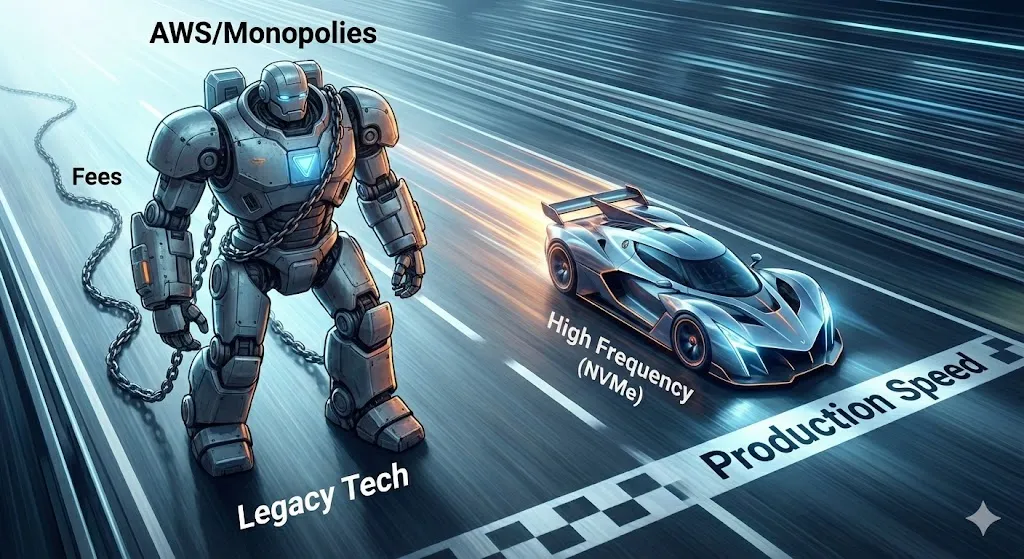
Vultr is huge, but they still act like a developer-focused company. They don’t have hidden fees. They give you massive bandwidth because they know developers need it.

If you want to run an “Agency-Grade” system, you need raw power, not brand name markup.
Part 4: Implementation Guide (How to Switch Today)
Ready to cross the Reliability Gap? Here is your step-by-step roadmap to setting up a n8n production workflow environment on Vultr.
Step 1: Get the Infrastructure (Risk-Free)
You don’t need to pay to test this. Because I use Vultr heavily, I can get you a “Developer Test Drive.”
Use the link below to get $300 in Free Credits.
This is enough to run a powerful 4GB RAM server for months while you learn.
👉 Click Here to Claim $300 Vultr Credits
(Note: You must link a payment method to verify you are a real human, but they won’t charge you if you stay within the credits).
Step 2: The Setup (Standard vs. Easy Mode)
Once you are in Vultr, you have two paths.
Path A: The “Agency Pro” Way (Docker)
- Deploy a High Frequency Compute instance.
- Choose Ubuntu 24.04.
- SSH into your server and install Docker.
- Use a docker-compose.yml file to spin up n8n, PostgreSQL, and Redis.(This enables the Queue Mode architecture we discussed).
Path B: The “One-Click” Way (Hostinger)
If the idea of a terminal scares you, there is an alternative. Hostinger recently launched a pre-configured n8n VPS Template.
- It installs everything for you in one click.
- It’s not as powerful as Vultr’s High Frequency, but it gets the job done for smaller setups.
- I still recommend Vultr for the raw NVMe speed, but Hostinger is a valid “Easy Mode.”
Step 3: Configuring the Sentinel
Once your self-hosted instance is live:
- Go to Settings -> Log Streaming.
- Set up your “Global Error Workflow” as we discussed in Part 2.
- Sleep soundly knowing that if anything breaks, you will know before your client does.
Conclusion: Stop Renting, Start Owning
The “Reliability Gap” isn’t just a technical problem; it’s a mindset problem.
As long as you are relying on the limitations of a Free Tier or the confusing billing of a monopoly like AWS, you are renting your business’s stability. You are scared to use retries. You are scared to scale.
Self-hosting on Vultr changes that.
It gives you the freedom to run 100,000 executions, to retry failed APIs 10 times, and to process massive files without asking for permission.
That is how you build an agency. That is how you build value.
Your Homework for Day 18:
- Create your Vultr Account and grab the $300 Credit.
- Spin up a test server.
- Migrate one of your “fragile” workflows to this new beast and turn on “Retry on Fail.”
I’ll see you in Day 19, where we will take this new power and learn how to do Parallel Processing to do 100 things at once.
Alfaz Mahmud Rizve
Automation Engineer & Founder
WhoIsAlfaz.me
Related Articles: