Outstanding Ideas for YouTube Shorts: The Ultimate Automation Blueprint
Looking for outstanding ideas for YouTube Shorts? Stop guessing. Learn how to build an automated content engine using n8n and QuickVid. By Alfaz Mahmud Rizve at whoisalfaz.me.
The Only Idea That Matters
Every day, thousands of creators search for “outstanding ideas for YouTube Shorts.” They scour Reddit, scroll through TikTok trends, and pay for expensive “viral lists.” They are looking for the golden ticket—the one video concept that will explode their channel.
But at whoisalfaz.me, we believe they are asking the wrong question.
The problem isn’t a lack of ideas. The problem is execution. You can have the best idea in the world, but if you can’t produce it consistently, edit it perfectly, and post it daily, the algorithm will ignore you.
Here is the controversial truth Alfaz Mahmud Rizve tells his clients: The most outstanding idea you can have in 2025 is to stop making videos yourself.
Instead of hunting for one-off topics, you should be building an Infinite Content Loop. Imagine a system that wakes up, scans the world’s news, identifies trending topics, writes a script, and produces a professional video—all before you’ve had your morning coffee.
In this guide, I am going to give you the blueprint for this exact system. We aren’t just brainstorming; we are engineering. We will use n8n, OpenAI, and the generative power of QuickVid to turn the abstract concept of “outstanding ideas” into a tangible, automated reality.
Why Automation is the Ultimate “Outstanding Idea”
When we talk about outstanding ideas for YouTube Shorts, we usually categorize them into niches: “Satisfying Videos,” “Tech News,” or “Motivation.”
But consider the “Automator’s Advantage.”
- Speed to Market: While manual creators are still editing their “Tech News” video from yesterday, your automation has already posted the breaking news from 10 minutes ago.
- Consistency: The YouTube algorithm loves consistency. An automated workflow never gets sick, never takes a holiday, and never gets writer’s block.
- Scale: Once you build this workflow for a “Crypto” channel, you can copy-paste it to create a “Health” channel in 5 minutes.
This guide serves as the technical backbone for the AI Content Systems category here at whoisalfaz.me. By the end of this post, you won’t just have an idea; you will have a machine.
The Architecture of an Automated “Idea Engine”
To generate outstanding ideas for YouTube Shorts on autopilot, we need to mimic the creative process of a human team.
A human team has three roles:
- The Researcher: Finds the story (The Trigger).
- The Writer: Scripts the story (The Processor).
- The Editor: Visualizes the story (The Generator).
In our n8n workflow, we replace these humans with nodes.
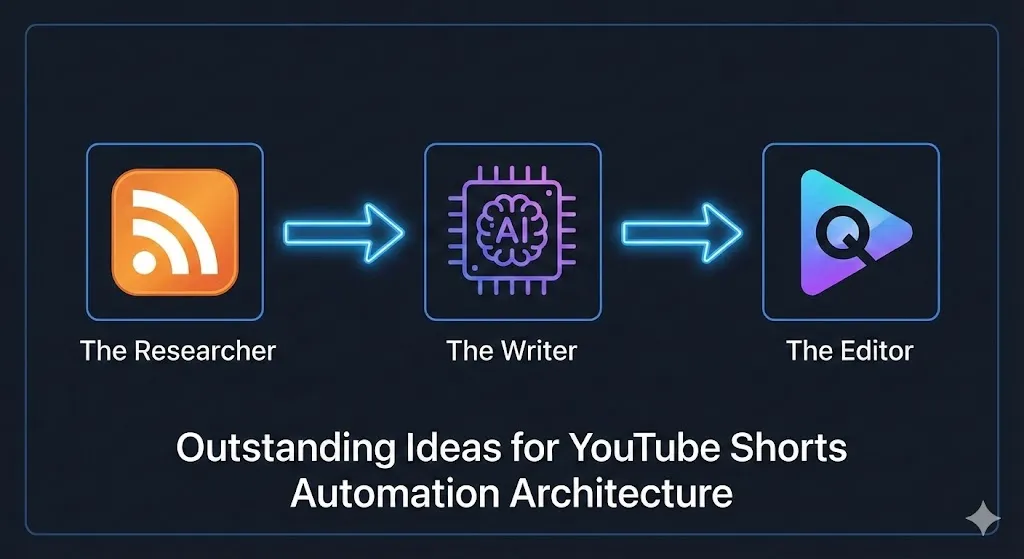
Alfaz Mahmud Rizve recommends this specific stack because it is “Headless”—it runs without a user interface, meaning it can run 24/7 on a server for pennies.
Step 1: The Researcher (Sourcing Outstanding Ideas)
The quality of your output depends entirely on the quality of your input. If you feed garbage into the AI, you get garbage videos out. To ensure we are generating truly outstanding ideas for YouTube Shorts, we need high-quality data sources.
We will use the RSS Read node as our primary “Researcher.”
Configuration Strategy:
- Add the RSS Read Node: Paste the URL of a high-authority source.
- For Tech: TechCrunch or The Verge.
- For Finance: CoinDesk or CNBC.
- The “Virality” Filter: This is the secret sauce. You don’t want to make a video about every article. You only want the ones that are likely to perform. Use an If node to filter the titles.
- Condition: Title contains “Breaking”, “New”, “Alert”, or “Revealed”.
- Why? These words trigger curiosity—a key component of high-performing Shorts.
Deduplication Strategy: At whoisalfaz.me, we use a “memory” system. We connect the RSS node to a simple database (like Airtable or Supabase) to check: “Have we already made a video about this?” If yes, the workflow stops. This prevents your channel from looking like a spam bot.
Step 2: The Writer (Scripting for Retention)
Having a news article is not the same as having a video script. A blog post is designed to be read; a YouTube Short is designed to be watched.
We need an LLM (Large Language Model) to act as our scriptwriter. We will use the OpenAI node with the gpt-4o model for maximum creativity.
The Prompt Engineering: This is where most automation fails. Generic prompts produce generic videos. To get outstanding ideas for YouTube Shorts, you need a system prompt that understands pacing.
The “Alfaz” Viral Script Prompt:
You are an expert viral video scriptwriter for YouTube Shorts.
I will give you a news headline: {{ $json["title"] }}
I will give you a summary: {{ $json["contentSnippet"] }}

Write a 45-second video script following this structure:
1. The Hook (0-3s): A polarizing statement or shocking question.
2. The Meat (3-30s): Explain the 'what' and 'why' using short, punchy sentences.
3. The Twist (30-40s): A counter-intuitive point or hidden detail.
4. The CTA (40-45s): A question to drive comments.

STRICT RULES:
- No visual descriptions (e.g., "Scene 1"). Return ONLY the spoken text.
- No emojis or hashtags in the spoken text.
- Tone: High energy, urgent, insider knowledge.
By forcing this structure, we ensure every video hits the psychological triggers required for retention.
Step 3: The Editor (QuickVid Integration)
Now we turn text into video. This is usually the most expensive part of the process, but with QuickVid, it becomes the cheapest.
QuickVid is the engine that makes this entire “Outstanding Idea” viable. It handles stock footage selection, subtitles, voiceovers, and background music in a single API call.
Pro Tip: If you are serious about scale, check out the QuickVid Lifetime Deal ($47). It’s a rare offer that removes the monthly subscription headache, perfect for testing these workflows without recurring costs.
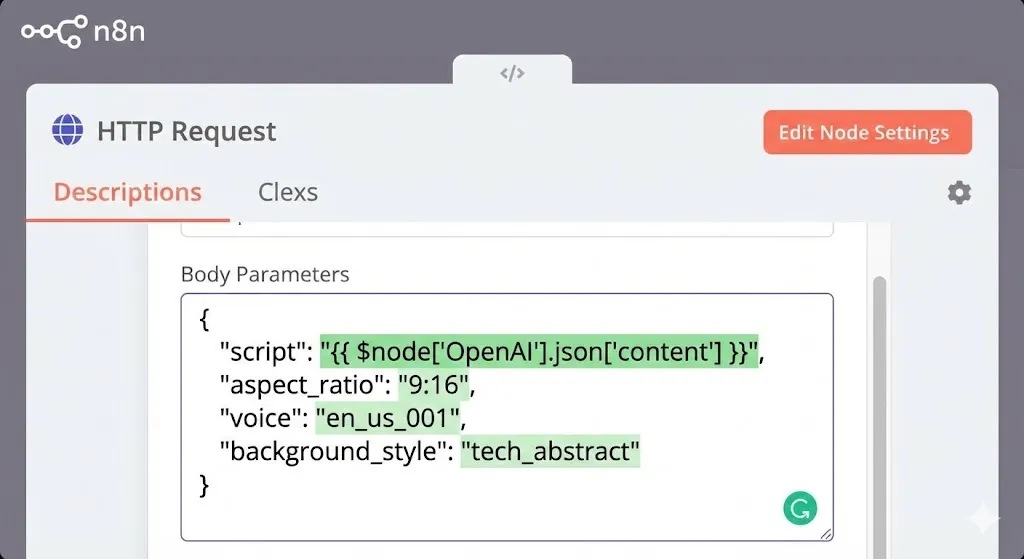
Setting up the HTTP Request Node: Since there isn’t a native QuickVid node in n8n yet, we will use the generic HTTP Request node.
- Method: POST
- URL:
https://api.quickvid.ai/v1/generate - Authentication: Header Auth (Key:
API-KEY, Value:Your_QuickVid_Key)
The JSON Body:
JSON
{
  "script": "{{ $node['OpenAI'].json['content'] }}",
  "aspect_ratio": "9:16",
  "voice": "en_us_001",
  "background_style": "tech_abstract"
}
Alfaz Mahmud Rizve’s Pro Tip: Make the background_style dynamic. Use a Switch node before this step to analyze the topic.
- If topic is “Money” → Set background to “luxury_office”.
- If topic is “Coding” → Set background to “cyberpunk_city”. This subtle shift makes your content feel handmade, differentiating it from the “AI Slop” flooding the platform.
Step 4: The “Virality Filter” (Advanced Smart Automation)
This is an advanced section for those who want to take their automation to the elite level.
Blindly automating news is good, but automating trends is better. How do we ensure our outstanding ideas for YouTube Shorts are actually what people are searching for right now?
We integrate the YouTube Data API.
The Logic: Before we generate a video, we ask YouTube: “Is this keyword trending?”
- Add HTTP Request Node (YouTube Search):
- Endpoint:
GET https://www.googleapis.com/youtube/v3/search - Query: The keyword from our RSS feed.
- Parameter:
order=viewCount,publishedAfter=2024-01-01.
- Endpoint:
- The Analysis:
- Look at the top 5 results. Do they have over 100,000 views?
- If YES: This is a validated “Outstanding Idea.” Proceed to QuickVid.
- If NO: The topic is cold. Discard it.
By adding this “Validation Gate,” you save money on API credits and ensure your channel only publishes high-demand content. This is the difference between a spam bot and a media empire.
Step 5: Advanced Debugging for Video APIs
Video generation is heavy. It is not like sending a text message; it takes time to render. If you don’t handle this correctly, your workflow will crash.
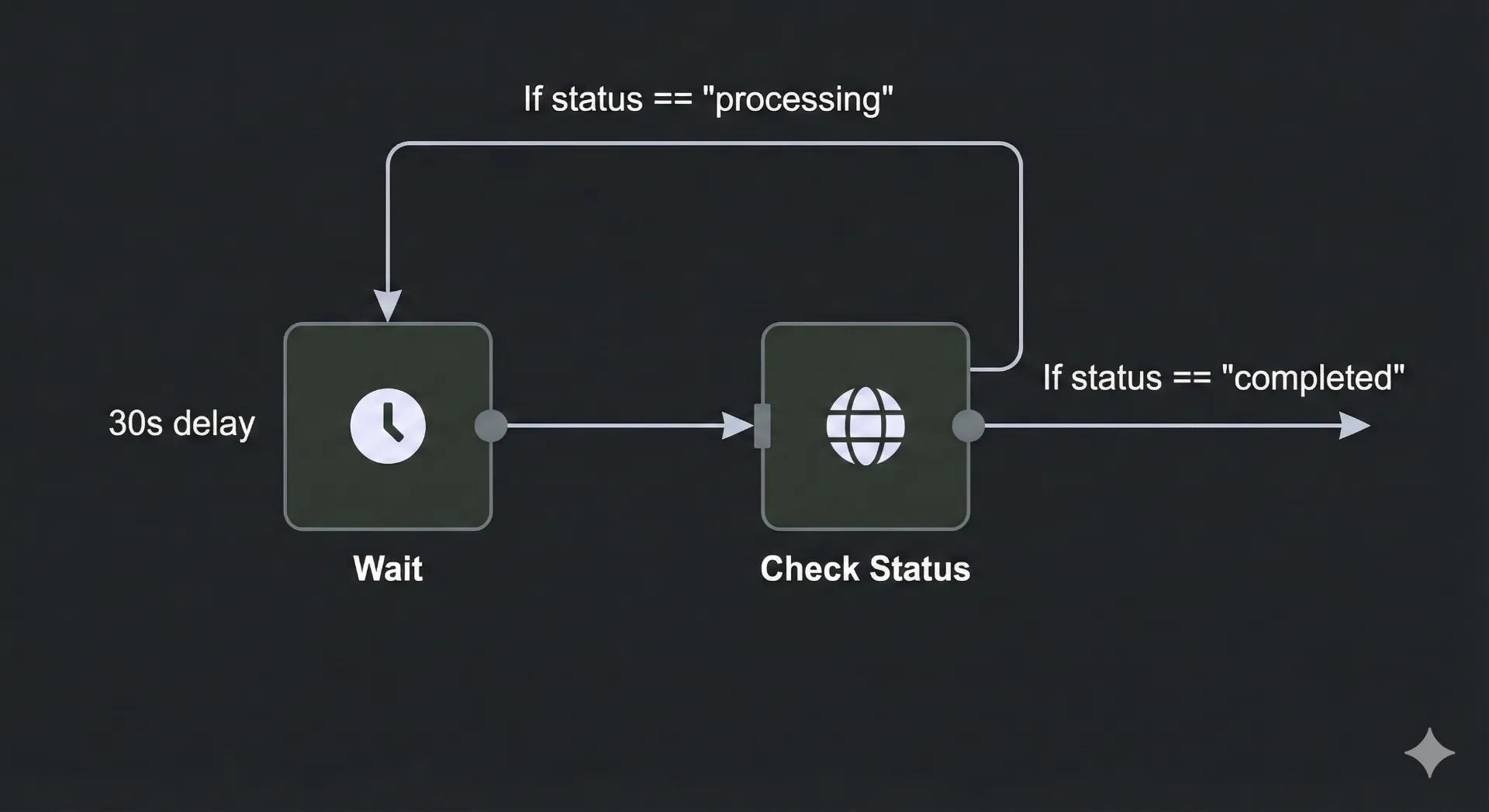
The “Async” Challenge: When you send a request to QuickVid, it doesn’t give you the video immediately. It gives you a processing status. If you try to upload that to YouTube immediately, it will fail.
The Solution: The Polling Loop
- Wait Node: Add a Wait node set to 30 seconds.
- Check Status: Add an HTTP Request to “Get Video Status.”
- If Logic:
- If
status==completed: Break the loop and download. - If
status==processing: Loop back to the Wait node.
- If
Alfaz Mahmud Rizve advises adding a “Max Retries” counter to this loop. If the video isn’t ready after 10 minutes, something is wrong. Send yourself a Slack alert and kill the execution so it doesn’t run forever.
Real-World Example: The “Crypto News” Bot
Let’s look at a live example from a project I advised on. A client wanted outstanding ideas for YouTube Shorts in the crypto niche but had zero time to record.
The Workflow:
- Trigger: Monitors
CoinDeskRSS feed for keywords “Bitcoin” or “Ethereum.” - Filter: Ignores any article with “Analysis” in the title (too boring).
- OpenAI: Rewrites the news into a “Breaking News” style script, focusing on price action.
- QuickVid: Generates the video using a specific “Matrix/Cyber” visual theme.
- Delivery: Uploads the video to a Google Drive folder named “To Review.”
The Result: The client wakes up to 3-5 ready-made videos every morning. They watch them, approve the best one, and post it manually. This semi-automated approach saved them roughly 15 hours of editing work per week.
Checklist: Is Your “Idea Engine” Ready?
Before you hit “Activate” and let this run on your server, run through this checklist. Alfaz Mahmud Rizve uses this for every agency deployment at whoisalfaz.me.
- [ ] API Limits Checked: Do you have enough credits in OpenAI and QuickVid to handle the volume of your RSS feed?
- [ ] Error Handling: Did you add a “Catch Error” node? (See my Day 7 guide on Error Handling for this).
- [ ] Deduplication: Are you tracking which URLs you’ve already processed?
- [ ] Prompt Safety: Have you tested your OpenAI prompt to ensure it doesn’t generate text that violates YouTube’s policies?
- [ ] Account Status: Ensure your QuickVid account is active. If you need a fresh account, use this Direct Signup Link to get started immediately.
Series Context: Building the AI Content Engine
This post is the inaugural entry in our new AI Content Systems category at whoisalfaz.me, where we move beyond basic tutorials and focus on building revenue-generating assets.
While this guide focuses on the application of video automation to generate outstanding ideas for YouTube Shorts, the engine running underneath is n8n. If you are new to the platform or find the node setup confusing, I recommend checking out my core n8n Automation Series. There, you will find foundational guides on setting up your first workflow, handling errors, and managing credentials—essential skills before you attempt a complex build like this one.
Next Up in AI Content Systems: In our next installment, we will explore “The Repurposing Machine”—how to take your existing long-form videos and automatically chop them into Shorts using AI.
Ready to Build the Machine?
You now have the blueprint for generating outstanding ideas for YouTube Shorts on autopilot.
To execute this workflow, you need the right tools. Step 1: Create your QuickVid account here. (This is the tool powering the “Editor” node). Step 2: Set up your self-hosted n8n instance. Step 3: Start with a simple RSS -> Slack workflow to test your trigger, then upgrade to video.
If you are an agency owner scaling multiple channels, I highly recommend checking the Affiliates Info Page—you can actually get paid to set this up for your clients.
If you build this, I want to see it. Send me your generated videos or tag me on social media. Let’s automate the boring stuff so we can focus on the big picture.
Subscribe to the whoisalfaz.me newsletter for the direct JSON download of this workflow in next week’s edition.